Posts

Showing posts with the label C#

Using Facebook login in ASP.NET application
Image
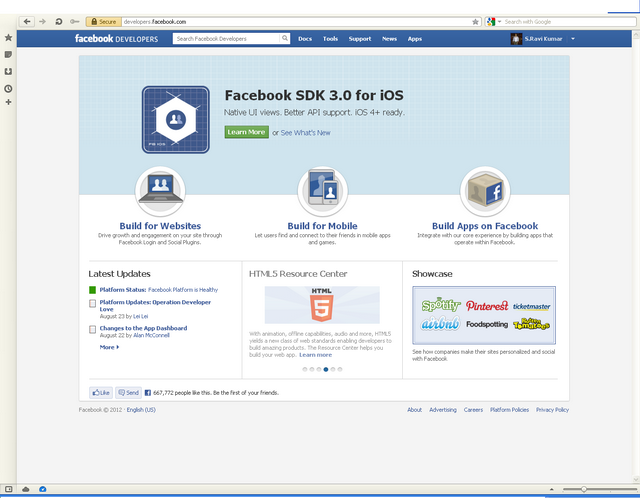
Using Facebook login in ASP.NET application Step-1: Register site in Facebook: Open http://developers.facebook.com and login with your Facebook credentials after logging in you will get a screen like this: Click on "Build for Websites" link, you will reach to https://developers.facebook.com/docs/guides/web/ , just click on 'Apps' menu Items (the last menu Item from right side), you will reach to https://developers.facebook.com/apps. Click on   button, you will get following screen. Enter the name of your website in place of App Name, rest of the fields are optional so fill them if you require to use them and click on 'Continue' button. you will be asked to fill a captcha screen and then you will get the summary screen like below screenshot (Just masked the AppID). Give the URL of you webs...

Convert Unix Time Stamp To System Date Time

Convert Unix Time Stamp To System Date Time Step 1 Copy the function code below and paste in your page.   public string ConvertToUnixTimeStapToDateTime(double timestamp)     {                 // First make a System.DateTime equivalent to the UNIX Epoch.         System.DateTime dateTime = new System.DateTime(1970, 1, 1, 0, 0, 0, 0);         // Add the number of seconds in UNIX timestamp to be converted.         dateTime = dateTime.AddSeconds(timestamp);         // The dateTime now contains the right date/time so to format the string,         // use the standard formatting methods of the DateTime object.         string resDate = dateTime.ToShortDateString() + " " + dateTime.ToShortTimeString();         return resDate;     } Step 2 Call the function and p...

Convert HtmlToPDF in ASP.net & iTextshrap

Convert Web Page to PDF  in ASP.net & iTextshrap Step 1 Download iTextSharp dll from below link's Download iTextSharp dll iTextsharp_Dll Download Step 2 Create a sample website in .net . Add reference the downloaded dll . Step 3 Create a page  and design you report in this web page and put one button for Export to pdf . Step 4 C# Add namespaces below  . using System.IO; using iTextSharp.text; using iTextSharp.text.html.simpleparser; using iTextSharp.text.pdf; using System.Text; Copy and Paste below code in Export Button click event .  Response.ContentType = "application/pdf";         Response.AddHeader("content-disposition", "attachment;filename=TestPage.pdf");         Response.Cache.SetCacheability(HttpCacheability.NoCache);         StringWriter sw = new StringWriter();         HtmlTextWriter hw = new HtmlTextWriter(sw);     ...

Stock Quote and Chart with yahoo using c#

Stock Quote and Chart with yahoo using c# Step 1 Create a website with visual studio and copy the below code paste in your page code behind . Code    protected void Page_Load(object sender, EventArgs e)         {             if (!IsPostBack)             {                 // The page is being loaded and accessed for the first time.                 // Retrieve user input from the form.                 if (Request.QueryString["s"] == null)                     // Set the default stock symbol to YHOO.                     m_symbol = "STER.NS";                 else                   ...

Create Job Schedule On Web using ASP.net

Create Job Schedule On Web using ASP.net Step 1 Create Global.asax file in your application. Step 2 Copy below code and paste in Global.asax file . Code  <script runat="server">     void Application_Start(object sender, EventArgs e)      {         System.Timers.Timer timScheduledTask = new System.Timers.Timer();         // Timer interval is set in miliseconds,         // In this case, we'll run a task every minute         timScheduledTask.Interval = 60 * 1000;         timScheduledTask.Enabled = true;         // Add handler for Elapsed event         timScheduledTask.Elapsed +=         new System.Timers. ElapsedEventHandler( timScheduledTask_Elapsed);         timScheduledTask.Stop();         timScheduledTas...

Create Pivot Table In C#

Image
Step 1 Create Class file as Pivot.cs  and copy the below text and save in your file . using System; using System.Collections.Generic; using System.Linq; using System.Web; using System.Data; /// <summary> /// Pivots the data /// </summary> public class Pivot {     private DataTable _SourceTable = new DataTable();     private IEnumerable<DataRow> _Source = new List<DataRow>(); public Pivot(DataTable SourceTable) {         _SourceTable = SourceTable;         _Source = SourceTable.Rows.Cast<DataRow>(); }     /// <summary>     /// Pivots the DataTable based on provided RowField, DataField, Aggregate Function and ColumnFields.//     /// </summary>     /// <param name="rowField">The column name of the Source Table which you want to spread into rows</param>     /// <param name="dataField">...

Get Pay Pal ID Token Step By Step

1. Click the My Account tab. 2. Click Profile at the top of the page. 3. On the right under Selling Preferences click on Website Payment Preferences. 4. Under Auto Return for Website Payments click "on" 5. After Return URL put http://masterindotnet.blogspot.in/ 6. Under Payment Data Transfer (Optional) click "on" 7. Scroll to the bottom of the page and click Save. 8. Copy the Identity Token (everything after the word "Token:" in the new window), and paste it into your Mall PayPal Information.

Copy Excel Worksheet One File to Another File in c#

Please flow the below steps . Step 1 Add reference Microsoft.Office.Interop.Excel; Step 2 Use below namespace . using Microsoft.Office.Interop.Excel; using System.Reflection; Step 3 Copy & Paste below code inside the button click event or any event you want to copy worksheet destination file to source file .   ApplicationClass excelApplicationClass = new ApplicationClass();             _Workbook finalWorkbook = null;             Workbook workBook = null;             Worksheet workSheet = null;             Worksheet newWorksheet = null;             try             {                 //Open the destination WorkBook                 finalWorkbook = excelApplicationClass.Workbooks.Open(Serv...